
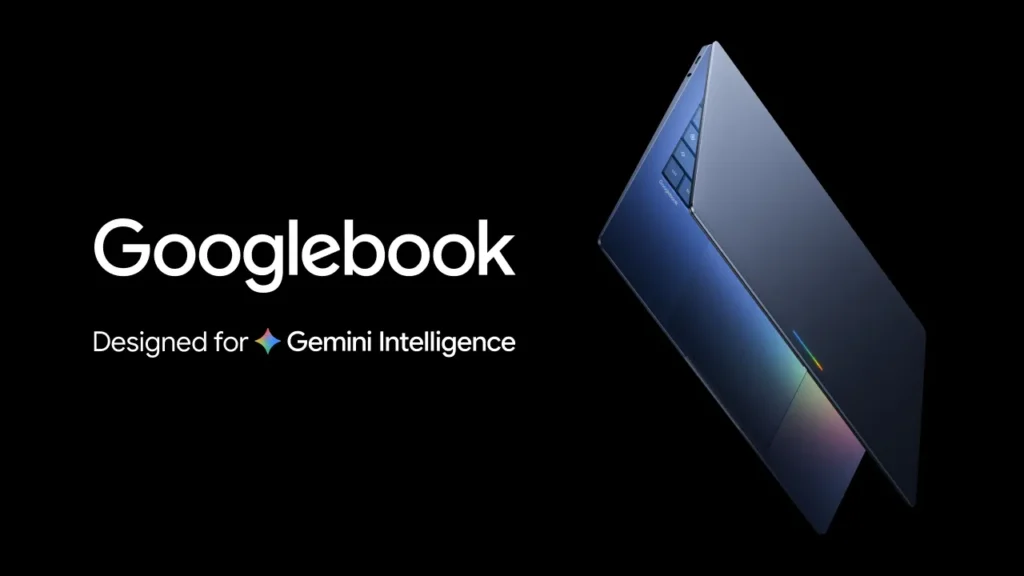
Google announced Googlebook in May as a new line of laptops built around its Gemini AI models. Pre-orders opened on September 21 with five launch models from Acer, ASUS, Dell, HP and Lenovo, and the first units reach US stores on October 4.
The bigger change is underneath. Googlebooks run a new Android-based operating system instead of ChromeOS, so this is closer to a platform switch than a routine laptop refresh. This article covers what Google has confirmed, what early hands-on reports add, and what is still unanswered.
One caution on sourcing. Review units are only arriving now, so the battery and performance figures below are claims from Google and its hardware partners, not independent test results. Where a detail comes from a single outlet, the text says so.
Googlebook at a glance
| Detail | What has been announced |
|---|---|
| Announced | May 12, 2026 |
| Pre-orders opened | September 21, 2026 |
| On sale | October 4 in the US; October 5 in Canada, the UK, Ireland, France, Germany, and Australia |
| Starting price | $899 (US) |
| Operating system | Googlebook OS, built on Android with ChromeOS desktop components |
| Chips at launch | Intel Core Ultra Series 3 and Qualcomm Snapdragon X Elite |
| Memory | 16GB baseline, up to 32GB on some models |
| On-device AI hardware | Neural processing units rated above 45 TOPS |
| Battery (Google’s figures) | Up to 14 hours of video, 16 hours of web browsing |
| Software support | Feature drops and updates for up to 10 years |
Dates, specs, and support terms come from Google’s pre-order announcement and its hardware overview.
What a Googlebook is
Googlebook is a category, not a single product. Google writes the software and sets a hardware baseline, and partners build the machines. Chromebooks have worked that way for 15 years, but Googlebooks sit above Chromebooks in both price and performance.
Google calls them the first laptops built around Gemini Intelligence from the start, meaning help that anticipates what the user needs. The software combines the Android technology stack with desktop foundations from ChromeOS. Buyers get desktop Chrome with extensions, Android apps from the Play Store, and an isolated Linux environment for developers.
TechCrunch describes the launch as the start of a long move away from ChromeOS. Google hasn’t said outright that Googlebook replaces the Chromebook, but TechCrunch treats it as the successor and as an answer to Microsoft’s Copilot+ PCs, which have been on sale since 2024.
The main features
Magic Pointer
Wiggle the cursor, and Gemini suggests actions based on what is under it. TechCrunch’s examples are pointing at a date in an email to set up a meeting, or selecting two images, such as a living room and a new couch, to see them combined. Alexander Kuscher, a senior director at Google, said the aim is for the AI to be present without being intrusive. Google says the pointer only activates when you summon it.
Rambler
Rambler is voice dictation that edits as it listens. Instead of recording every stutter and filler word, it turns a rambling stream of thoughts into organized notes with action items, and it handles several languages, including a switch mid-sentence. It also adds emoji, which not everyone will want in meeting notes. Rambler has its own key, next to the Quick Insert key.
Create My Widget
You describe a widget in plain language, and Gemini builds it. Google’s examples include a sports score tracker and a countdown to a family trip. Gemini can also pull from the web and from Gmail and Calendar to assemble one dashboard, such as flight, hotel, and restaurant details for a reunion in Berlin.
Android phone integration
Setup carries over an Android phone’s settings, saved passwords, Wi-Fi networks, and messages, protected by end-to-end encryption, according to Google. Three tools then link the devices. Continue On resumes a task from your phone via the taskbar. The Files app browses and searches phone files and photos. Cast My Apps streams a phone app into a desktop window.
Developer tools
Google includes Antigravity, its AI agent development platform, plus a full Linux terminal that can run tools such as Claude Code or Antigravity CLI. Google says the terminal sits inside an isolated environment on a pKVM hypervisor with a Level 5 security certification, which it calls a first for laptops.
The five launch models
Google says every model uses premium materials such as aluminum, magnesium alloy, or carbon fiber, and has a haptic trackpad and a backlit keyboard. Chrome Unboxed adds that all five screens reach at least 500 nits and four of the five are OLED.
| Model | US price | Screen | Chip | Worth knowing |
|---|---|---|---|---|
| Acer Googlebook 14 | $899 | 14-inch 2.8K OLED touch | Intel Core Ultra Series 3 | The only 360-degree convertible |
| Dell XPS Googlebook | $999 | 13.4-inch 2.5K touch (not OLED) | Snapdragon X Elite | The most compact of the five |
| Lenovo Googlebook 15 | $1,099 | 15.3-inch 2.8K OLED touch | Intel Core Ultra Series 3 | The only large-screen model |
| ASUS Googlebook 14 | $1,299 | 14-inch 3K OLED touch | Intel Core Ultra Series 3 | Weighs 2.2 pounds |
| HP Googlebook 14 | $1,299 | 14-inch 2.8K OLED touch | Snapdragon X Elite | All-aluminum body, face unlock and fingerprint reader |
Prices and screen details come from Chrome Unboxed’s hands-on with all five models.
The $899 figure in Google’s marketing applies only to the Acer. The other four cost between $100 and $400 more.
Specs and battery claims
All five start at 16GB of memory, and some configurations go up to 32GB. Each has an NPU rated above 45 TOPS, which Google says lets Gemini features run locally without loud fans. Google rates the lineup at up to 14 hours of video playback and 16 hours of web browsing. Per-model figures on Google’s store page range from 13 to 18 hours for the models it lists, so the headline number is a starting point. None of these ratings have been independently measured yet.
Googlebook OS and the Chromebook question
Googlebook OS is not a ChromeOS update. It is a separate Android-based platform that Google positions as a successor experience. Google has confirmed that ChromeOS devices will keep getting updates through mid-2034, though timelines differ by device. That date first surfaced in US antitrust court records.
Google says many of its newest Chromebooks will be eligible to move to Googlebook OS, but it hasn’t said how. It hasn’t announced pricing or terms for enterprise and education licenses either, and Chromebooks from 2021 or earlier are the most likely to face eligibility questions. For schools and IT teams, those gaps are the part to watch.
Price, bundle and availability
Every Googlebook includes 12 months of Google AI Pro, which Google says brings 5TB of cloud storage and higher Gemini usage limits. The bundle also has three months of YouTube Premium and Adobe Photoshop, among other perks, and a year of GeForce NOW cloud gaming. Those subscriptions expire, so the long-term cost depends on whether you keep paying for them.
Pre-orders run through the Google Store, Best Buy and select retailers. Units reach US shelves on October 4 and shelves in six other countries on October 5. Google’s announcement doesn’t name any other markets yet.
What we don’t know yet
App support is the first open question. MakeUseOf’s hands-on says it will likely be rough at launch and argues that paying about double the price of a Chromebook Plus needs a clear reason. On the unit 9to5Google tested, Gmail and Calendar ran as web-based wrappers instead of native Android apps, and Google told the site that each app team decides which format to use.
The second is how much of the AI sits behind an account. TechRadar’s hands-on notes that some features need a Gemini account and usage tokens. Google’s launch posts also talk about on-device Gemini but don’t list which tasks stay local and which go to the cloud.
The third is performance. Chrome Unboxed says its review units arrive on the October 4 and 5 release dates, so the first real battery tests and a comparison of the Intel and Snapdragon models should follow within weeks.
Should you buy one now?
It depends on your apps. Android phone owners who want close phone and laptop integration have the clearest case. Anyone who relies on specific desktop software should confirm it runs on Googlebook OS before paying. Schools and businesses are better off waiting for licensing details.
Googlebook FAQs
Is a Googlebook the same as a Chromebook?
No. Googlebooks run Googlebook OS, which combines Android and ChromeOS, and Gemini is built into the system. tomsguide
How much does a Googlebook cost?
Launch models run from $899 to $1,299 in the US.
When can I buy one?
October 4 in the US, and October 5 in Canada, the UK, Ireland, France, Germany, and Australia.
Will my Chromebook get Googlebook OS?
Google says many newer models will be eligible, but it hasn’t published a model list or a migration method.

Pingback: Apple's Next Act: Smart Glasses, a Pendant, and AI-Powered AirPods