

Every time you type your email address into a signup form, you’re handing over more than a way to receive a receipt. That address is a durable ID, and ad networks, data brokers, and the occasional hacker can use it to connect the dots between the person who bought running shoes online and that same person’s social network account.
Brave wants to break that link. On August 27, 2026, the company shipped Email Aliases inside version 1.94 of its desktop browser: a built-in tool that lets you generate a disposable email address on the spot, right inside a signup form, without leaving the page or installing an extension.
Here’s what the feature actually does, how it compares to the alias tools already built into Firefox, iCloud, and DuckDuckGo, and where it still falls short.
What Brave Browser’s New Email Aliases Feature Does
Email Aliases work about the way the name suggests. Click into an email field on a website, and Brave offers to generate a random, unique address (something like quiet-otter-42@bravealias.com) and fills it in for you. Mail sent to that address forwards straight to your real inbox. The website itself never sees your actual email.
If a company starts spamming that address, sells it to a data broker, or gets breached and leaks it, you deactivate that one alias. Your main inbox and every other account stay untouched.
This isn’t a new idea. Firefox, Apple, and DuckDuckGo have all shipped similar tools over the past several years (more on how they compare below). What’s notable here is that Brave built the feature directly into the browser’s autofill flow rather than requiring a separate extension, and tied it to a free account tier that doesn’t require a paid subscription.
Why Your Email Address Is a Bigger Privacy Problem Than Your Cookies
Brave already blocks plenty of cross-site tracking through Shields, its built-in ad and tracker blocker, and through cookie and cache partitioning that keeps what one website stores about you from following you to the next. But in its announcement post, Brave’s VP of Privacy and Security, Shivan Kaul Sahib, pointed out that this protection has a blind spot: it only covers what happens inside your browser.
Your email address doesn’t share that limitation. Ad platforms including Google, Meta, and LinkedIn all offer tools that let businesses upload a list of customer emails and match them against the platform’s own user records. Say a shoe store you just bought from and a social network you signed up for years ago both have your email address on file. The two companies can link your identity between them directly, server-to-server, with no cookies or browser activity involved anywhere in the process. Brave’s tracker blocking can’t see or stop that exchange, because it never touches your device in the first place.
There’s a second risk sitting underneath that one. A website’s security is only as good as the company running it, and email addresses that leak in a data breach tend to keep circulating long after the breach itself is forgotten. Once an address is out, it can end up for sale on data-broker lists or resurface in phishing campaigns years later, something Wired’s reporting on leaked-credential markets has documented repeatedly. An alias limits the damage: if the single address tied to a breached company is abused, you kill it and move on, leaving everything else intact.
How Brave Email Aliases Work Under the Hood
A few technical details are worth knowing before you turn the feature on:
- You need a free Brave Account. This is separate from Brave Premium, the paid tier used for things like the Brave VPN. Signing up only takes an email address and a password.
- Your password never reaches Brave’s servers. Brave Accounts authenticate using OPAQUE, a cryptographic protocol that was only recently standardized, so the password itself is never transmitted over the network.
- Brave doesn’t read your forwarded mail. The company says messages sent to an alias are scanned only for spam and malware, then deleted from Brave’s servers within seconds of being forwarded to your real inbox.
- Notes stay private. You can attach a short note to an alias to remind yourself what it’s for. Those notes live only on your device unless you turn on Brave Sync, in which case they’re encrypted end-to-end so that even Brave can’t read them.
How to Set Up Brave Email Aliases
Getting started takes about a minute.
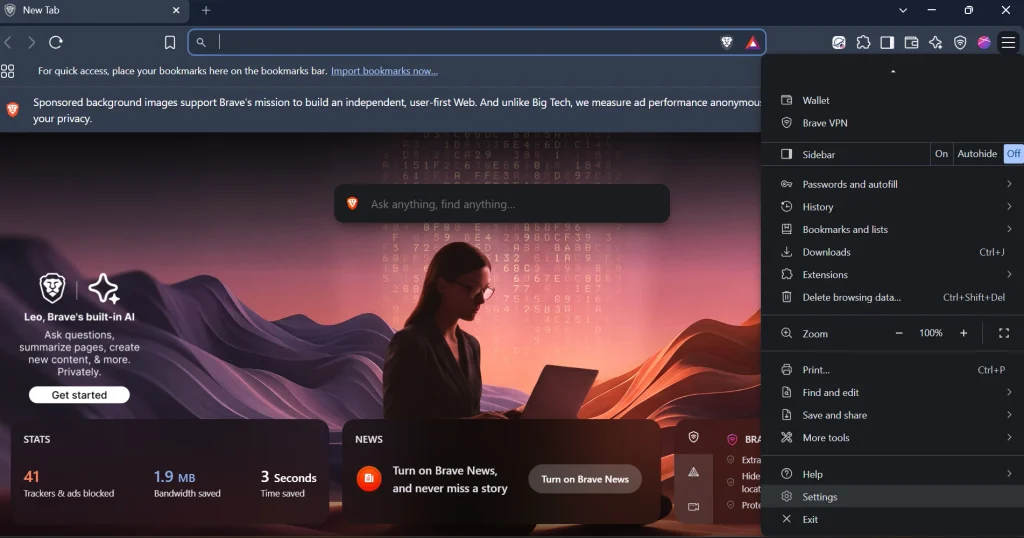
- Update Brave to version 1.94 or later. The feature doesn’t exist on older versions, and as of this writing, it’s desktop-only (Windows, macOS, and Linux) while Brave works on a mobile release.
- Create a Brave Account. Go to
brave://settings/email-aliasesin your address bar and click “Log in or create a Brave account.” Enter the address you want aliases forwarded to, set a password, and verify it. - Generate an alias on any signup form. Click into an email field on a website, and Brave will offer to fill in a new alias. If the prompt doesn’t appear, right-click the field and choose “New Email Alias” from the context menu.
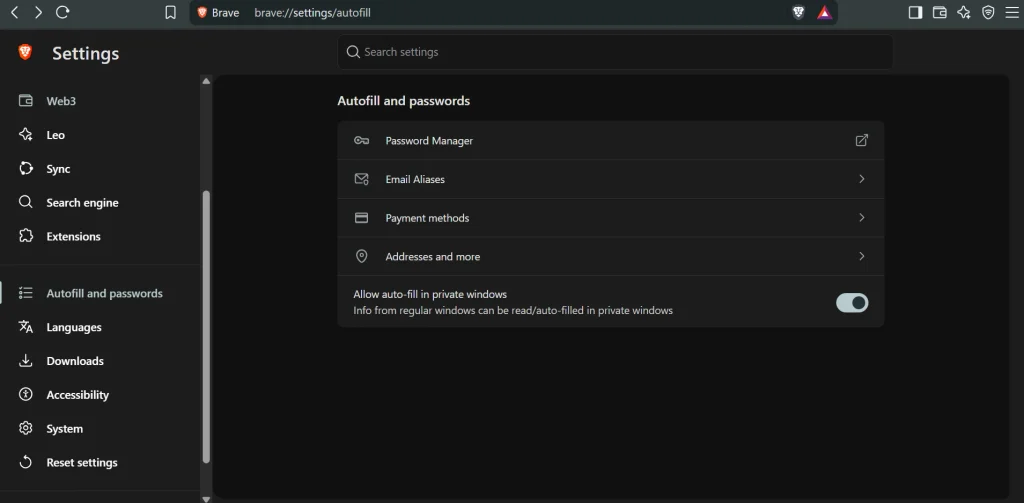
- Manage your aliases. Go to Settings > Autofill & Passwords > Email Aliases to see everything you’ve created, add notes, or deactivate the ones you no longer need.
What to Expect (and Where It Falls Short) Right Now
Brave has been upfront that this is an early release rather than a finished product, and a few caveats are worth flagging before you rely on it:
- Only five free aliases. Running a mail-forwarding service costs money, so Brave capped the free tier at five while it gathers feedback on how people actually use it. A paid Premium tier with a higher limit is planned, though Brave hasn’t said when or what it will cost.
- Expect some spam-folder hiccups at first. Because Brave’s mail servers are new, some forwarded messages may land in spam until Brave builds a sending reputation with major mail providers. Brave’s own advice is to mark the first one as “not spam,” which should help later messages route correctly.
- Desktop only, for now. Mobile support is on Brave’s roadmap but hasn’t shipped.
- No visible reply-from-alias option. Brave’s public documentation doesn’t describe a way to send or reply directly from an alias; you can only receive forwarded mail through it. That puts Brave a step behind Firefox Relay and iCloud+, both of which support replying through the alias on their paid tiers.
How Brave Compares to Other Email Alias Tools
Brave isn’t the first browser or privacy tool to offer disposable email addresses. Here’s how the free tiers stack up as of late August 2026:
| Service | Free Alias Limit | Where It Works | Requires |
|---|---|---|---|
| Brave Email Aliases | 5 | Built into the Brave desktop browser | Free Brave Account |
| Firefox Relay | 50* | Browser extension or relay.firefox.com; works in any browser | Free Firefox Account |
| Apple Hide My Email | Unlimited, but only through “Sign in with Apple” buttons | Safari, Mail, and supported apps on Apple devices | Free Apple Account for the limited version; iCloud+ subscription (from roughly $1/month) for on-demand aliases anywhere |
| DuckDuckGo Email Protection | Unlimited | Browser extension (Chrome, Firefox, Edge, Brave, Opera) or DuckDuckGo apps | Free DuckDuckGo account; works with any existing inbox |
*Firefox raised its free limit from five to fifty masks in a quiet update in May 2026, as PCWorld reported at the time.
A few things stand out. DuckDuckGo and Firefox both offer a more generous, or outright unlimited, free tier. DuckDuckGo’s version has the added benefit of stripping tracking pixels out of forwarded mail, not just hiding the address, which is a feature Brave hasn’t mentioned building yet. Apple’s version is the most restrictive unless you pay for iCloud+, and it’s also the most tied to Apple’s own devices and apps. Where Brave has an edge is convenience: there’s no extension to install and no separate app to open, just a prompt that appears the moment you click into an email field.
Should You Turn It On?
For most people who already use Brave, yes. It costs nothing, takes about a minute to set up, and closes off a tracking method that cookie blockers can’t touch. It’s a good fit if you sign up for a lot of newsletters, trials, or one-off accounts and want an easy way to cut off the spam later without changing your main email address.
If you’re already a heavy alias user on Firefox Relay, DuckDuckGo Email Protection, or a dedicated alias service, the five-alias cap will feel tight fast. There’s no reason to pick just one, though. Use Brave’s version for quick, low-stakes signups, and keep a higher-limit service around for everything else.
Frequently Asked Questions
Is Brave’s Email Aliases feature free?
Yes. Every Brave user gets five free email aliases with no subscription required. Brave has said a paid Premium tier with a higher limit is planned, but no pricing or launch date has been announced.
Does Brave read the contents of my forwarded emails?
No. Brave says it only scans messages for spam and malware, and deletes them from its servers within seconds of forwarding them to your real inbox.
Can I use Brave Email Aliases on my phone?
Not yet. The feature currently works only on Brave for desktop (Windows, macOS, and Linux). Brave has said mobile support is in development.
What happens if I hit the five-alias limit?
You’ll need to deactivate an existing alias to free up a slot, or wait for Brave’s planned Premium tier, which is expected to raise the limit.
Can I reply to an email sent to my alias?
Based on Brave’s current documentation, replying through the forwarded message reveals your real email address rather than the alias, a limitation that competing services like Apple’s iCloud+ tier don’t share.
Further Reading
- Brave’s official Email Aliases report
- Brave support: What is a Brave Email Alias?
- TechCrunch: Brave’s browser one-ups Chrome with new support for email aliases
- PCWorld: Firefox’s free email mask service got a massive update
- Firefox Relay
- DuckDuckGo Email Protection
- Apple: What you can do with iCloud+ and Hide My Email

Pingback: What Is Ace Browser? Features, Pricing, and Safety Explained
Pingback: What Is the Google Go App? Features, Uses, and Requirements